
Spring Audit Report (SAR) Prep Aids & Resources
Key Dates
May 18 – SAR Submission Portal opens: credentials emailed to SAR contacts and portal opens for data entry & file uploads.
June 5 – SAR Submission Portal closes for data entry. (No signatures are needed at this point.) Portal will accessible, but no data will be editable. If there is an error, please contact your Program Liaison.
June 18 – Last day for Program Liaisons to issue SAR Evaluation Signature Forms to SAR contacts. (Please contact your Program Liaison if you will need your SAR Evaluation Form prior to this date.)
June 26 – Last day for Signed SAR Evaluation Forms to be uploaded to the SAR Submission Portal.
Process Flow
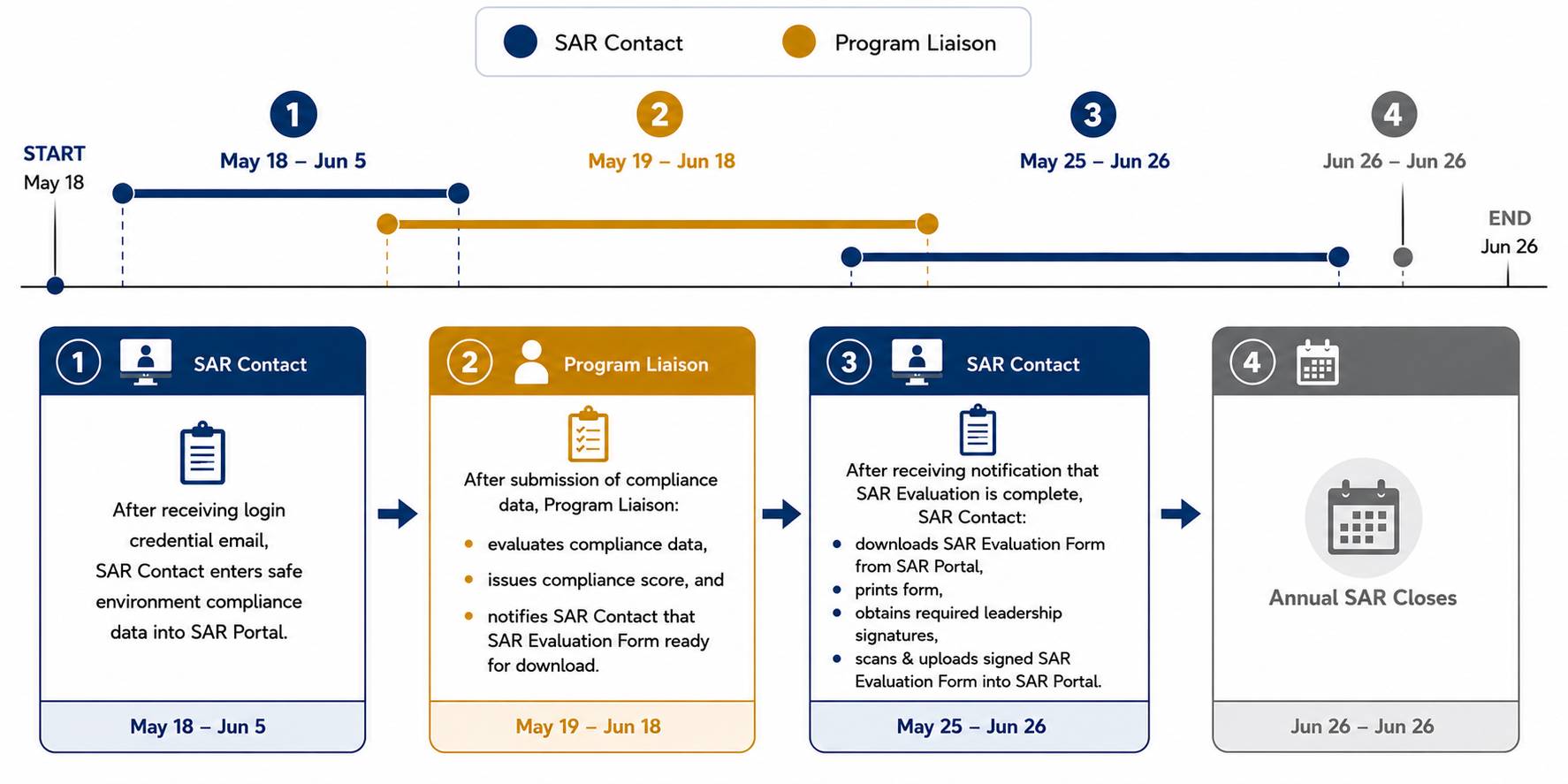
Click image to enlarge.
Questions? Please contact your OPCY Program Liaison.
Portal Aids
Optional: PSL Attendance Tracking Aids
- How to export VIRTUS PSL attendance – preparing PSL attendance, if applicable
- Children’s Program PSL tracking worksheet – aid for preparing PSL attendance
Submission Flow
Submission process will be conducted in two phases:
Phase 1: SAR Contact enters safe environment compliance data into SAR Portal no later than June 5.
– SAR Contact Submits and Pauses –
Program Liaison reviews and scores SAR Evaluation Form and notifies SAR Contact via email when scoring is complete.
– SAR Contact Continues with Phase 2 –
Phase 2: Submitters will upload the signed SAR Evaluation Form to the SAR portal no later than June 26. **Final submission requires SAR Evaluation form signed by the pastor and leadership.
Reporting Data
In addition to entering safe environment credentialing information, two more areas of input are included for this program year:
- Storing Safe Environment Records Survey Question: How does your parish/school store safe environment records for background check reports and personal safety lesson attendance?
- OPTIONAL UPLOAD of PSL attendance record data for the 2025-26 program year.
Scoring/Evaluation Criteria
Submitted data will be evaluated based upon the SAR Evaluation Rubric.
Why is there a change in the SAR process flow?
The four-phase submission process ensures data accuracy prior to collecting leadership acceptance signatures. This also allows OPCY to prepare Archdiocesan-wide data for submission to the USCCB Secretariat of Child and Youth Protection in accordance with Article 9 of the Charter for the Protection of Children and Young People.
Can someone walk me through the process? I'm confused.
Absolutely. Please contact your Program Liaison and they will assist you.
Who do I need to report on?
Parishes:
- Include all adult employees currently on your parish or school payroll as their primary location (who submit a W4).
- All current adult volunteers who interact with minors of vulnerable adults with your parish as their primary location.
Schools:
- Include all adult educators currently on your payroll as their primary location (who submit a W4).
- Include all adult employees currently on your payroll as their primary location (who submit a W4).
- All current adult volunteers who interact with minors of vulnerable adults with your school as their primary location.
See Safe Environment E3 Role Descriptions to clarify who fits into what role.
Who should be included on my report?
Parishes:
- Include all adult employees currently on your parish or school payroll as their primary location (who submit a W4).
- All current adult volunteers who interact with minors of vulnerable adults with your parish as their primary location.
Schools:
- Include all adult educators currently on your payroll as their primary location (who submit a W4).
- Include all adult employees currently on your payroll as their primary location (who submit a W4).
- All current adult volunteers who interact with minors of vulnerable adults with your school as their primary location.
See Safe Environment E3 Role Descriptions to clarify who fits into what role.
Does my report need to include only individuals whose primary location is my parish/school, or anyone who has my parish/school listed as a location?
Your report only needs to include individual who have your parish or school as their primary location. For your convenience, use the pre-saved Master Report titled “SAR Parameters” to validate and submit your data in the SAR Portal for the audit.
When the SAR Submission Portal closes for data entry on June 5, what does that mean?
All audit data for your location must be submitted by June 5. After that date, you will still be able to view the data, but you will not be able to make changes. If you identify a submission error after June 5, please contact your Program Liaison.
How soon may I run the report to get started?
You may run the pre-saved Master Report titled “SAR Parameters” now to validate your credentialed users.
It is recommended to run the report again on the day you submit your data, especially if there is a delay before submitting data on the SAR Portal.
How do I get my 'Signature Sheet'?
The SAR Evaluation Form (formerly called the ‘Signature Sheet’) will be available in the SAR Portal after your Program Liaison completes the review and scoring. You will receive an email with instructions for downloading and resubmitting the signed form when it is available.
When can I obtain the form for leadership signatures?
After your Program Liaison reviews your submission and assigns a score, you will receive an email with instructions to:
- Download the SAR Evaluation Form from the SAR Portal and
- Upload the signed SAR Evaluation Form to the SAR Portal
Turnaround Goal
- Program Liaisons hope to have SAR Evaluation Forms available within 3–5 business days after submission.
- All forms will be issued no later than June 18.
If you need the SAR Evaluation Form by a specific date, contact your Program Liaison.
Do I need to transfer my PSL attendance information into VIRTUS or the Excel spreadsheet?
No. Attendance data does not need to be transferred into those formats. They are optional tools.
If you choose to submit the optional, detailed PSL attendance information, you may submit it in either XLS or PDF format.
If I use Google Sheets, do I need to move my PSL attendance information into the Excel spreadsheet?
No. You may continue using Google Sheets. If you choose to submit the optional, detailed PSL attendance information, you may submit it in PDF format.
Who needs to sign the SAR Evaluation Form?
For Parishes:
- SEC
- Pastor/Parochial Administrator
- Trustee
For Schools:
- SEC
- Pastor/Canonically approved administrator or other governing body
- Principal
- Trustee or School Board Officer
How should I report volunteer leadership?
Please contact your Program Liaison with any questions regarding reporting volunteer leadership.